

लोग Beat Maker Pro क्यों छोड़ते हैं
- सबसे उपयोगी सैंपल पैक सब्सक्रिप्शन के पीछे हैं। मुफ्त पैड छोटे रोटेशन में घूमते हैं, और स्क्रीनशॉट वाले trap, dubstep और EDM किट अनलॉक करने के लिए सक्रिय प्रीमियम प्लान चाहिए।
- विज्ञापन फ्लो तोड़ते हैं। सेशन के बीच इंटरस्टीशियल बीट बनाने की लय काटते हैं — इस कैटेगरी में ज़्यादातर ऐप्स से ज़्यादा मायने रखता है।
- मुफ्त टियर पर एक्सपोर्ट विकल्प सीमित हैं। तैयार बीट को उच्च गुणवत्ता WAV में सेव करना या वॉटरमार्क के बिना शेयर करना पेड स्टेप है।
- MWM परिवार एक जैसे मुद्रीकरण पैटर्न साझा करता है। Beat Maker Pro के साथ Drum Pad Machine और Music Maker JAM आज़माने वाले तीनों में एक जैसी paywall संरचना बताते हैं — परिवार के भीतर बदलना बेकार है।
- केवल-पैड मॉडल आइडिया के लिए तेज़ है लेकिन नतीजे के साथ क्या कर सकते हैं, सीमित करता है। लाइव रिकॉर्डिंग, MIDI इनपुट या ठीक से मिक्सिंग के लिए आखिरकार दूसरे ऐप की ज़रूरत पड़ती है।
अगर इनमें से कोई बात जानी-पहचानी लगे, तो यहाँ सात Beat Maker Pro विकल्प हैं जिन्हें आज़माना चाहिए।
आपको कौन सा ऐप चुनना चाहिए?
-
FL Studio Mobile अगर आपको असली DAW अपग्रेड चाहिए, एक बार भुगतान और हमेशा के लिए आपका। पैड वर्कफ़्लो पूरे सीक्वेंसर और मिक्सर तक बढ़ता है।
-
Groovepad अगर आपको वही तुरंत-पैड अनुभव मुफ्त चाहिए। Beat Maker Pro इंटरफ़ेस से सबसे करीबी सीधा मैच।
-
Drum Pad Machine अगर EDM और dubstep आपके जॉनर हैं। सैंपल पैक dance की ओर झुके हैं और सीखने की घुमावदार रेखा कोमल है।
-
BandLab अगर आप पैड बीट को पूरा गाना बनाना चाहते हैं। सैंपलर, रिकॉर्डिंग और शेयरिंग कम्युनिटी वाली मुफ्त DAW।
-
Remixlive अगर आप लाइव परफॉर्म करना चाहते हैं। Mixvibes का ऐप स्टेज के लिए बना है, पैड के बीच crossfade और FX के साथ।
-
Caustic 3 अगर सिंथेसिस और सीक्वेंसिंग तैयार पैक से ज़्यादा मायने रखते हैं। एक बार की कीमत, गहरा मॉड्यूलर रैक।
-
n-Track Studio अगर आप बीट के ऊपर लाइव इंस्ट्रूमेंट और वोकल रिकॉर्ड करते हैं। ठीक मिक्सिंग वाली पूरी मल्टी-ट्रैक DAW।
Beat Maker Pro पर तब तक रहें जब तक खास MWM सैंपल पैक और ट्यूटोरियल लाइब्रेरी ही आपको ऐप दोबारा खोलने पर मजबूर करती हो। कोई विकल्प बिल्कुल वही लूप लाइब्रेरी नहीं लाता।
1. FL Studio Mobile — गंभीर अपग्रेड के लिए सर्वश्रेष्ठ pro DAW
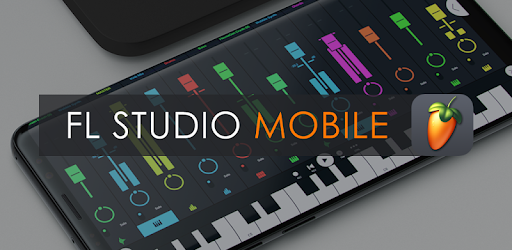
FL Studio Mobile डेस्कटॉप प्रोडक्शन वातावरण का सबसे करीबी मोबाइल रिश्तेदार है। Step Sequencer ठीक वही पैड वर्कफ़्लो कवर करता है जो Beat Maker Pro यूज़र पहले से जानते हैं, फिर Piano Roll, मिक्सर, ऑटोमेशन और डेस्कटॉप FL Studio वाली इफेक्ट चेन जोड़ता है। प्रोजेक्ट बिना कन्वर्ज़न मोबाइल और डेस्कटॉप के बीच जाते हैं।
जिन Beat Maker Pro यूज़र ने आठ-पैड की छत पार कर ली और ड्रम पैटर्न पर मेलोडी, बासलाइन और वोकल लेयर करना चाहते हैं, उनके लिए FL Studio Mobile अपग्रेड है। एक बार की कीमत पूरी तरह सब्सक्रिप्शन मॉडल बदल देती है; लंबी अवधि में Beat Maker Pro प्रीमियम से सस्ता पड़ता है।
ट्रेड-ऑफ सीखने की घुमावदार रेखा है। एक स्क्रीन वाले ड्रम पैड ऐप से पूरी DAW पर जाने का मतलब पहले बीट के पहले कुछ सेशन ट्रैक, पैटर्न और रूटिंग समझने में।
फायदे:
- डेस्कटॉप FL Studio के साथ प्रोजेक्ट संगतता
- 133 इंस्ट्रूमेंट और इफेक्ट शामिल
- एक बार की खरीद, कोई सब्सक्रिप्शन नहीं
- प्रोफेशनल Step Sequencer और Piano Roll
नुकसान:
- ऊपर से ज़्यादा कीमत
- और खड़ी सीखने की घुमावदार रेखा
- लाइव finger-drumming सेशन के लिए नहीं बना
कीमत: Google Play पर लगभग $14.99 एक बार। App Store और Samsung Galaxy Store पर मिलती-जुलती कीमतें।
2. Groovepad — Beat Maker Pro का सबसे करीबी मुफ्त अनुभव

Easybrain का Groovepad Beat Maker Pro इंटरफ़ेस को सबसे सीधे दर्शाता है। एक स्क्रीन पैड, जॉनर-थीम लूप पैक, फ़िल्टर और reverb जैसे कुछ इफेक्ट टॉगल और रिकॉर्ड बटन। जिन्हें मूल Beat Maker Pro वर्कफ़्लो पसंद था लेकिन paywall से चिढ़, वे बिना दोबारा सीखे बदल सकते हैं।
मुफ्त टियर में hip-hop, trap, EDM, house और dubstep स्टार्टर पैक हैं, नियमित नए पैक रिलीज़ के साथ। प्रीमियम सब्सक्रिप्शन विज्ञापन हटाता है और बड़ी लाइब्रेरी खोलता है, लेकिन मुफ्त अनुभव इतना उपयोगी है जितना Beat Maker Pro का मुफ्त नहीं।
वही एक-स्क्रीन डिज़ाइन जो Groovepad को सुलभ बनाता है, उसकी छत भी है। गाने की अरेंजमेंट व्यू, MIDI इनपुट और रेंडर किए ऑडियो से आगे ठीक एक्सपोर्ट नहीं।
फायदे:
- खेलने योग्य hip-hop, trap, EDM और house पैक के साथ मुफ्त
- Beat Maker Pro जैसा लगभग एक जैसा वर्कफ़्लो
- मुफ्त टियर पर Beat Maker Pro से कम विज्ञापन
- मजबूत स्टार्टर पैक रोटेशन
नुकसान:
- पूरी पैक लाइब्रेरी के लिए प्रीमियम सब्सक्रिप्शन
- गाने की अरेंजमेंट व्यू नहीं
- MIDI इनपुट नहीं
कीमत: विज्ञापनों के साथ मुफ्त। सब्सक्रिप्शन प्रीमियम पैक खोलता है और विज्ञापन हटाता है।
3. Drum Pad Machine — EDM और dubstep के लिए सर्वश्रेष्ठ
AGM Group का मूल बीट मेकर Beat Maker Pro से साफ़ मुफ्त टियर और dance संगीत की ओर ज़्यादा झुकी सैंपल लाइब्रेरी रखता है। EDM, drum-and-bass, dubstep और big-room house ड्रॉप बनाने वालों को यहाँ मुफ्त पैक में ज़्यादा काम का सामान मिलता है।
पैड लेआउट प्रति पैड चेन किए सैंपल सपोर्ट करता है — Beat Maker Pro के one-shot मॉडल और ठीक सैंपलर के बीच। पैड लेसन नए यूज़र को जाने-माने dance ट्रैक के पैटर्न से गुज़ारते हैं, जिन्हें Beat Maker Pro ज़्यादातर प्रीमियम के पीछे छिपाता है।
पकड़ यह है कि सब्सक्रिप्शन मॉडल इस ऐप में भी आ गया। लेसन और सबसे गहरे पैक टियर लॉक हैं। मुख्य ऐप की Aptoide लिस्टिंग गायब है — Google Play के बिना Android यूज़र को जॉनर स्पिन-ऑफ (Club Drum Pad Machine, Trap Drum Pad Machine) या दूसरे स्रोत की ज़रूरत।
फायदे:
- Beat Maker Pro से मजबूत मुफ्त टियर
- EDM, dubstep और dance-केंद्रित पैक लाइब्रेरी
- लोकप्रिय ट्रैक के लिए पैड लेसन
- प्रति पैड चेन किए सैंपल
नुकसान:
- प्रीमियम सब्सक्रिप्शन सबसे गहरे पैक लॉक करता है
- मुख्य Aptoide लिस्टिंग गायब
- dance के बाहर संकीर्ण जॉनर फोकस
कीमत: विज्ञापनों के साथ मुफ्त। सब्सक्रिप्शन प्रीमियम पैक खोलता है और विज्ञापन हटाता है।
4. BandLab — पूरे गाने का सर्वश्रेष्ठ मुफ्त रास्ता

BandLab 16-ट्रैक सीमा, असली रिकॉर्डिंग, असली मिक्सिंग और Beat Maker Pro पैड-लूप वर्कफ़्लो कवर करने वाले सैंपलर के साथ मुफ्त पूरी मोबाइल DAW है। SongStarter कॉर्ड प्रोग्रेशन से इंस्ट्रूमेंटल बीज बनाता है। Splitter किसी रेफरेंस ट्रैक से ड्रम या वोकल निकालता है। शामिल सैंपल लाइब्रेरी में सैंकड़ों royalty-free लूप हैं।
जो Beat Maker Pro यूज़र पैड बीट को असली गाना बनाना चाहते हैं, BandLab अगला स्टेज बिना पेड अपग्रेड के संभालता है। बीट पर वोकल, गिटार और मास्टरिंग मुफ्त बिल्ड में काम करती है।
मेंबरशिप अपसेल है, ज़्यादातर AI टूल, एडवांस FX और stem अलगाव के आसपास। मुफ्त बिल्ड पूरी तरह कार्यशील है। क्लाउड सिंक के लिए अकाउंट चाहिए — Beat Maker Pro पूरी तरह छोड़ता है।
फायदे:
- प्रोजेक्ट कैप के बिना मुफ्त 16-ट्रैक DAW
- SongStarter और Splitter मुफ्त शामिल
- सैंकड़ों royalty-free लूप बंडल
- सक्रिय शेयरिंग कम्युनिटी
नुकसान:
- क्लाउड अकाउंट ज़रूरी
- AI टूल मेंबरशिप के पीछे
- शुद्ध पैड मेकर से भारी ऐप
कीमत: पूरी DAW के साथ मुफ्त। वैकल्पिक मेंबरशिप AI और एडवांस FX खोलती है।
5. Remixlive — लाइव पैड परफॉर्मेंस के लिए सर्वश्रेष्ठ

Mixvibes का Remixlive स्टूडियो स्केच की बजाय स्टेज और DJ बूथ के लिए बना है। 64-पैड लेआउट (आठ गुना आठ) लूप, one-shot और FX एक ही ग्रिड पर; किनारे का crossfader और वॉल्यूम स्लाइडर लाइव सेट की तरह रियल टाइम में पैड के बीच मिक्स करते हैं।
जो Beat Maker Pro यूज़र पैड बीट पार्टी या लाइवस्ट्रीम पर ले जाना चाहते हैं, Remixlive वह परफॉर्मेंस कोण कवर करता है जिसे Beat Maker Pro ने गंभीरता से नहीं लिया। Mixvibes लाइब्रेरी में जॉनर भर में हज़ारों royalty-free लूप; रिकॉर्ड मोड पूरी परफॉर्मेंस एक ट्रैक में कैप्चर करता है।
इंटरफ़ेस घनत्व Beat Maker Pro से ज़्यादा है। नए यूज़र लाइव परफॉर्मेंस प्राकृतिक लगने से पहले ग्रिड सीखने में एक सेशन लगाते हैं। पूरा Pro टियर और लूप लाइब्रेरी सब्सक्रिप्शन पर।
फायदे:
- लाइव परफॉर्मेंस के लिए 64-पैड ग्रिड
- एक ही स्क्रीन पर crossfader और FX स्ट्रिप
- विशाल royalty-free लूप लाइब्रेरी
- Pro रिकॉर्ड मोड पूरा सेशन कैप्चर
नुकसान:
- और खड़ी सीखने की घुमावदार रेखा
- सब्सक्रिप्शन पर Pro टियर
- फ़ोन संसाधनों पर भारी
कीमत: सीमित पैक के साथ मुफ्त। Pro सब्सक्रिप्शन पूरी Mixvibes लूप लाइब्रेरी खोलती है।
6. Caustic 3 — एक बार की कीमत पर सर्वश्रेष्ठ synth और drum rack

Caustic 3 Beat Maker Pro के विपरीत रास्ता लेता है। क्यूरेटेड लूप पैक की बजाय ऐप synthesizer, sampler और drum machine का रैक देता है जिसे आप अपना kit जोड़ते हैं। SubSynth, FM, PCM sampler, BassLine 303-स्टाइल मोनोसिंथ, BeatBox drum machine और उनके बीच मॉड्यूलर रूटिंग।
प्रीमियम पैक रोटेशन से थक Beat Maker Pro यूज़र जो मूल सामग्री चाहते हैं, Caustic देता है। कम्युनिटी कस्टम patch और preset ऐप से साझा करती है; एक बार unlock कीमत का मतलब कोई आवर्ती सब्सक्रिप्शन नहीं।
इंटरफ़ेस घना और दिखने में पुराना। Beat Maker Pro के साफ़ पैड लेआउट से आने वालों को असली समायोजन; गहराई दूसरे लीग की। पूरी तरह ऑफ़लाइन।
फायदे:
- $10 से कम एक बार की खरीद
- गहरी hands-on सिंथेसिस और सैंपलिंग
- मजबूत patch-शेयरिंग कम्युनिटी
- पूरी तरह ऑफ़लाइन काम करता है
नुकसान:
- Steep learning curve
- केवल Android
- दृश्य डिज़ाइन पुराना
कीमत: मुफ्त डेमो। पूरा unlock कम सिंगल-डिजिट की एक बार इन-ऐप खरीद है।
7. n-Track Studio — बीट के ऊपर रिकॉर्डिंग के लिए सर्वश्रेष्ठ

n-Track Studio स्पेक्ट्रम का मल्टी-ट्रैक रिकॉर्डिंग सिरा है। असीमित ऑडियो और इंस्ट्रूमेंट ट्रैक, वोकल पिच सुधार (VocalTune), गिटार ऐम्प सिम्युलेटर, convolution reverb और हर चैनल पर EQ और कंप्रेशन वाला पूरा मिक्सर। पैड-स्टाइल सैंपल ट्रिगर हैं लेकिन फोकस नहीं।
जो Beat Maker Pro में कुछ मिनटों में बीट बनाकर उस पर असली वोकल या लाइव इंस्ट्रूमेंट रिकॉर्ड करना चाहते हैं, n-Track Studio प्राकृतिक अगला कदम है। बाहरी MIDI कीबोर्ड और ऑडियो इंटरफ़ेस भी काम करते हैं — फ़ोन या टैबलेट छोटे होम स्टूडियो की जगह।
मुफ्त बिल्ड एक्सपोर्ट पर वॉटरमार्क लगाता है। Pro unlock हटाता है और एक बार इन-ऐप खरीद है; नवीनतम प्लगइन अपडेट चाहने वालों के लिए वैकल्पिक सब्सक्रिप्शन टियर।
फायदे:
- असीमित ऑडियो और इंस्ट्रूमेंट ट्रैक
- VocalTune पिच सुधार शामिल
- गिटार ऐम्प और convolution reverb
- बाहरी MIDI और ऑडियो इंटरफ़ेस सपोर्ट
नुकसान:
- मुफ्त टियर एक्सपोर्ट पर वॉटरमार्क
- बंडल पैड लूप लाइब्रेरी नहीं
- Heavier learning curve
कीमत: वॉटरमार्क के साथ मुफ्त। Pro unlock आमतौर पर एक बार इन-ऐप, वैकल्पिक सब्सक्रिप्शन।
त्वरित तुलना
| ऐप | सबसे अच्छा | कीमत मॉडल | खास फ़ीचर |
|---|---|---|---|
| FL Studio Mobile | Pro DAW अपग्रेड | एक बार | डेस्कटॉप FL क्रॉसओवर |
| Groovepad | मुफ्त पैड वर्कफ़्लो | मुफ्त या पेड | सबसे करीबी UI मैच |
| Drum Pad Machine | EDM and dubstep | मुफ्त या पेड | Dance-केंद्रित पैक |
| BandLab | बीट से पूरा गाना | मुफ्त | 16-ट्रैक DAW |
| Remixlive | लाइव परफॉर्मेंस | मुफ्त या पेड | 64-पैड ग्रिड और crossfader |
| Caustic 3 | Hands-on सिंथेसिस | एक बार | मॉड्यूलर synth रैक |
| n-Track Studio | बीट के ऊपर रिकॉर्डिंग | मुफ्त या पेड | असीमित ट्रैक और VocalTune |
FAQ
सबसे अच्छा मुफ्त Beat Maker Pro विकल्प कौन सा है?
BandLab सबसे मजबूत मुफ्त पिक है क्योंकि पूरी 16-ट्रैक DAW कोर फ़ीचर सेट पर सब्सक्रिप्शन गेट के बिना मुफ्त आती है। अगर खास एक-स्क्रीन पैड वर्कफ़्लो चाहिए तो Groovepad सबसे करीबी मुफ्त मैच।
क्या इन ऐप्स में बिना सब्सक्रिप्शन बीट बना सकता हूँ?
हाँ। FL Studio Mobile और Caustic 3 एक बार की खरीद। BandLab पूरी DAW के लिए मुफ्त। बाकी में अनिश्चितकालीन मुफ्त टियर हैं, हालाँकि कुछ पैक और FX सब्सक्रिप्शन के पीछे।
कौन सा ऐप Beat Maker Pro इंटरफ़ेस से सबसे करीब है?
Groovepad Beat Maker Pro इंटरफ़ेस को सबसे सीधे दर्शाता है। Drum Pad Machine चेन पैड और लेसन मोड से एक कदम आगे। दोनों समान जॉनर-थीम पैक वाले pad-first ऐप।
क्या तैयार बीट बिना वॉटरमार्क एक्सपोर्ट कर सकता हूँ?
BandLab, FL Studio Mobile और Caustic 3 कोर बिल्ड में बिना वॉटरमार्क साफ़ ऑडियो एक्सपोर्ट करते हैं। n-Track Studio मुफ्त बिल्ड पर वॉटरमार्क, Pro हटाता है। Groovepad और Remixlive प्रीमियम टियर पर हटाते हैं।
क्या ये ऐप ऑफ़लाइन काम करते हैं?
FL Studio Mobile, Caustic 3 और n-Track Studio पूरी तरह ऑफ़लाइन। BandLab एडिटिंग ऑफ़लाइन और इंटरनेट लौटने पर सिंक। Groovepad, Drum Pad Machine और Remixlive नए पैक डाउनलोड के लिए इंटरनेट चाहते हैं लेकिन कैश के बाद ऑफ़लाइन बजते हैं।
पूर्ण शुरुआती के लिए सबसे आसान विकल्प कौन सा?
Groovepad सबसे आसान प्रवेश क्योंकि एक-स्क्रीन पैड वर्कफ़्लो में सेटअप नहीं। ट्रैक-आधारित व्यू के लिए BandLab अगला कदम। FL Studio Mobile और Caustic 3 शुरू में ज़्यादा धैर्य माँगते हैं।

