
Ray tracing सालों से marketing में रहा, लेकिन फोन पर गेम visuals में असली बदलाव AI upscaling से आया। वही तर्क अब Android photo ऐप्स चलाता है: स्मार्ट मॉडल 1MP पारिवारिक तस्वीर को प्रिंट योग्य बना सकता है, या वीडियो फ्रेम से धुंधला crop बचा सकता है। फोन भार उठाता है, cloud बाकी, परिणाम सेकंडों में उपयोगी।
हमने छह AI image upscaling ऐप्स परखे जिन्हें सच में सुझाएँगे। सूची में generalist photo editors, dedicated AI enhancers, मुफ्त पहली पिक और paid power-user tools मिले हैं, और एक ऐप जिसका preview ईमानदार है।
AI upscaling ऐप में क्या देखें
चुनने से पहले कुछ बातें मायने रखती हैं:
- on-device या cloud में चलता है? on-device offline तेज़; cloud बड़े काम संभालता है।
- details बचाता है या hallucinate? कुछ ऐप्स स्रोत में न थे ऐसे चेहरे बना देते हैं।
- मुफ्त टियर high-resolution परिणाम सेव करने देता है या downscale?
- exports से EXIF हटती है और watermark? कई मुफ्त plans पर watermark।
- batch uploads? सैकड़ों photos पर एक-एक workflow टूट जाता है।
त्वरित तुलना
| ऐप | सबसे अच्छा | प्लेटफॉर्म | मुफ्त प्लान | paid टियर | watermark |
|---|---|---|---|---|---|
| Remini | चेहरे और portraits | Android, iOS | Yes (limited) | Premium subscription | मुफ्त plan परिणाम watermark |
| Snapseed | मैनुअल sharpening | Android, iOS | Yes | None | No |
| PicsArt | एक ऐप में सब कुछ | Android, iOS, web | Yes | Gold subscription | मुफ्त plan AI tools watermark |
| Adobe Photoshop Express | brand-safe edits | Android, iOS | Yes | Premium subscription | No |
| HitPaw Photo Enhancer | documents और पुरानी photos | Android, iOS, desktop | Limited free trial | Premium subscription | trial watermark |
| Pixelup | एक टैप upscales | Android | Yes (limited) | Premium subscription | मुफ्त plan watermark |
ऐप्स
1. Remini — portraits के लिए सबसे अच्छा
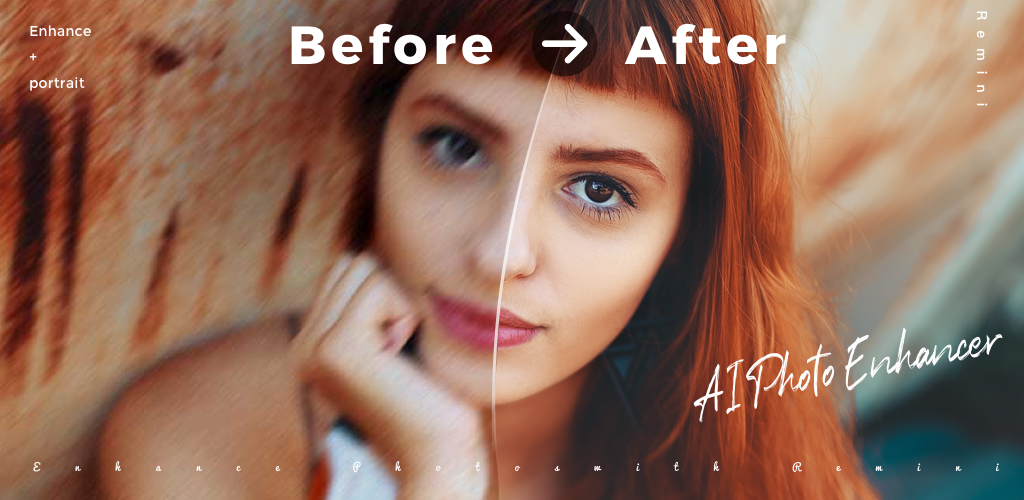
Remini वह ऐप है जिसने ज़्यादातर फोनों पर AI portrait restoration लोकप्रिय किया। face-detection-first pipeline आँखों, बालों और त्वचा में detail निकालता है बिना early enhancers वाले plastic finish के। हाल के अपडेट में video enhancer, “AI photos” generator (upscaling pass में हमने ignore किया), और तेज़ batch processing।
कमज़ोरियाँ: मुफ्त plan परिणाम watermark करता है और daily enhances सीमित। कम resolution स्रोतों पर मॉडल कभी झुर्रियाँ या jewellery गढ़ देता है।
कीमत:
- मुफ्त: watermark के साथ सीमित daily enhances
- paid: साप्ताहिक या वार्षिक subscription watermark और caps हटाता
प्लेटफॉर्म: Android, iOS
निष्कर्ष: पारिवारिक portraits और पुराने ID बहाल करने के लिए सही पिक।
2. Snapseed — मैनुअल sharpening
Snapseed Google का मुफ्त, विज्ञापन-रहित photo editor। Details tool structure और sharpening के अलग sliders देता है — subscription के बिना फोन पर hand-tuned upscale के सबसे करीब। Selective tool के साथ आँखें और चेहरा तेज़ कर सकते हैं बिना पीछे आसमान में noise बढ़ाए।
कमज़ोरियाँ: learned super-resolution नहीं। स्रोत भारी compressed हो तो manual tools कभी न थी detail नहीं बना सकते।
कीमत:
- मुफ्त: हर feature, कोई ad नहीं, subscription नहीं
प्लेटफॉर्म: Android, iOS
निष्कर्ष: हर Pixel और iPhone मालिक के पास होना चाहिए मुफ्त editor।
3. PicsArt — सब-इन-वन
PicsArt AI tools मिलाता है (super-resolution, background removal, generative fill) traditional editing के साथ एक bundle में। मुफ्त टियर daily AI enhances quota; iOS और Android builds account state साझा; Pixel-friendly editor HEIC, DNG, JPEG, PNG संभालता है।
कमज़ोरियाँ: मुफ्त टियर AI tools watermark करता और export resolution सीमित। notification stream ज़्यादातर editors से आक्रामक editorial features धकेलता है।
कीमत:
- मुफ्त: मुफ्त plan पर watermark के साथ daily AI quotas
- paid: unlimited AI tools और ऊँचा export के लिए PicsArt Gold
प्लेटफॉर्म: Android, iOS, web
निष्कर्ष: एक ऐप editing के साथ upscaling चाहिए तो सही पिक।
4. Adobe Photoshop Express — brand-safe edits
Adobe Photoshop Express Adobe Sensei models से जुड़ता है super-resolution और noise reduction के लिए। outputs EXIF बचाते, मूल untouched, Creative Cloud sync यदि हो। Pixel और iPhone HDR साफ import — ज़्यादातर ऐप्स JPEG में coerce करते हैं तब मायने रखता है।
कमज़ोरियाँ: मुफ्त टियर ads दिखाता और सबसे ऊँचा resolution export Premium के पीछे। AI tools बाज़ार में सबसे मजबूत नहीं; Adobe premium models Lightroom mobile में।
कीमत:
- मुफ्त: ads के साथ ज़्यादातर edits
- paid: Premium subscription या Creative Cloud bundle
प्लेटफॉर्म: Android, iOS
निष्कर्ष: पहले से Creative Cloud में रहने वालों के लिए predictable पिक।
5. HitPaw Photo Enhancer — documents और पुरानी photos
HitPaw Photo Enhancer dedicated AI enhancers में सबसे लचीला। model list per image face, general, animal या scratch-removal model — mobile पर दुर्लभ। low-light scans और faded prints विशेष रूप से अच्छे; document model line geometry बचाता जो दूसरे round कर देते।
कमज़ोरियाँ: desktop मजबूत; mobile batch छोटा। मुफ्त trial छोटा; paid plan वार्षिक झुकाव।
कीमत:
- मुफ्त: सीमित trial credits
- paid: मासिक, वार्षिक या lifetime
प्लेटफॉर्म: Android, iOS, Windows, macOS
निष्कर्ष: बहाल करने के लिए असली archive हो तो सही tool।
6. Pixelup — एक टैप upscales
Pixelup workflow एक बटन तक सीमित रखता है। photo डालें, 2x, 4x या face-priority चुनें, इंतज़ार। परिणाम चुने resolution पर डाउनलोड, मूल सुरक्षित। dashboard न चाहने वाले casual users के लिए।
कमज़ोरियाँ: मुफ्त plan watermark। portraits के लिए competent लेकिन best-in-class नहीं; उनके लिए Remini बेहतर।
कीमत:
- मुफ्त: watermark के साथ सीमित daily enhances
- paid: साप्ताहिक या वार्षिक subscription
प्लेटफॉर्म: Android
निष्कर्ष: model choice सोचना न हो तो त्वरित fix।
सही ऐप कैसे चुनें
विषय व्यक्ति हो तो Remini इंस्टॉल करें और paid सप्ताह/माह का budget हो। सूची में सबसे मजबूत portrait restorer।
मुफ्त चाहिए तो Snapseed इंस्टॉल करें, बिना account editor जो साफ sharpen करे। ऊपर किसी के साथ जोड़ें; Snapseed finishing tool।
एक ऐप चाहिए तो PicsArt इंस्टॉल करें हर photo job और subscription ठीक हो। Creative Cloud पहले से भुगतान या brand-safe outputs चाहिए तो Adobe Photoshop Express।
पुरानी prints, document scans या low-light shots का ढेर हो तो HitPaw Photo Enhancer। per-image model picker इसकी असली ताकत। pro features न चाहिए तो सबसे सरल Pixelup।
व्यावहारिक मुफ्त stack: fine control के लिए Snapseed प्लस दिन के portrait upscale के लिए Remini की मुफ्त quota; batch के लिए paid ऐप्स में से एक।
FAQ
निजी photos पर AI upscalers सुरक्षित हैं?
ज़्यादातर processing के लिए image cloud server भेजते हैं। upload से पहले privacy policy पढ़ें। Snapseed locally, कभी upload नहीं। Remini, PicsArt, Adobe, HitPaw, Pixelup cloud में।
क्या ये ऐप्स video frames upscale कर सकते हैं?
Remini और HitPaw अलग video enhancers देते हैं। बाकी stills पर।
screenshots पर AI upscaling काम करता है?
हाँ, परिणाम स्रोत पर। छोटे text वाले screenshots अक्सर खराब — मॉडल unsharp अक्षरों में detail गढ़ता है।
upscaled photos plastic क्यों लगती हैं?
base model चेहरे over-smooth करता है। कम enhancement strength, face-priority mode, या Snapseed Selective से effect कम करें।
बिना account इस्तेमाल कर सकते हैं?
Snapseed पूरी तरह anonymous। बाकी cloud processing के लिए account sign-in, मुफ्त टियर पर भी।

